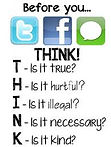
Top Ten Digital Citizenship Rules Students Should Know & Actually Follow
Think Before You Type
If you wouldn’t say it to someone's face with your mother watching, don’t post it.
Protect Your Passwords
“Password123” is basically an open invitation. Use strong, unique passwords and keep them to yourself.
Don’t Overshare
No one needs your address, schedule, or weirdly specific life updates. Protect your personal info.
Recognize Red Flags
Weird messages, sudden friend requests, suspicious links — don’t touch ’em.
Stop Falling for Fake Accounts
Catfishing is real. Check usernames, spelling, mutual friends, and whether the profile looks sketchy.
Cite Your Sources
Google didn’t write it. If you didn’t create it, credit whoever did.
Think Long-Term
The internet never forgets. Screenshots happen. Act like every post is permanent.
Be a Good Digital Neighbor
Don’t act like anonymity is a personality upgrade. Respect people, property, and boundaries online.
Keep Your Device Clean
Don’t download random files or click on pop-ups. Your Chromebook is not invincible.
Report — Don’t React
If you see bullying, threats, harassment, or anything off, report it to a trusted adult. You’re not Batman — don’t try to fix it alone.